This is one of the questions I get asked most often: "Should I leave my computer on all the time, or is it better to shut it off at night?" Here's the honest answer — it depends on how you have it plugged in. I'll tell you up front that my own computers run twenty-four hours a day. But I can do that only because I've taken some specific precautions, and those precautions are really what this guide is about.
The power coming out of your wall isn't as clean as you think
We tend to assume the electricity in our homes and offices is steady and even. It usually isn't. Real power is full of little spikes (sudden jumps up) and valleys (brief drops) — and computers don't like either one. A computer wants a smooth, steady flow of electricity. When the supply gets erratic, that's when you start to see trouble: random crashes, equipment that wears out early, and in a bad spike, components that fail outright.
So the real question isn't just "on or off" — it's "how well is it protected from the power feeding it?" That's what makes leaving a computer on safe or risky. Let's build up the answer one piece at a time.
Surge suppressors: smoothing out the spikes
A surge suppressor (often sold as a "surge protector" power strip) is designed to do one main job: catch those sudden spikes before they reach your equipment and shave them off. How well it does that depends on its energy-absorbing rating, which you'll see printed on the box or the unit itself, measured in Joules.
What's a Joule, simply? A Joule is just a unit of energy — think of it as the size of the "bucket" the suppressor can soak up a spike into. A 1,000-Joule strip can absorb a bigger jolt than a 500-Joule one before it's overwhelmed. So with Joules, the bigger the number, the better the protection.
Important: not every power strip is a surge suppressor. Plenty of strips are just a row of outlets on the end of an extension cord — they spread out your plugs and do nothing to protect against spikes. If the package and the strip itself don't say "surge protection" and show a Joule rating, assume it offers none. A plain power strip is fine for a lamp; it is not protection for a computer.
The UPS: a surge suppressor with a battery
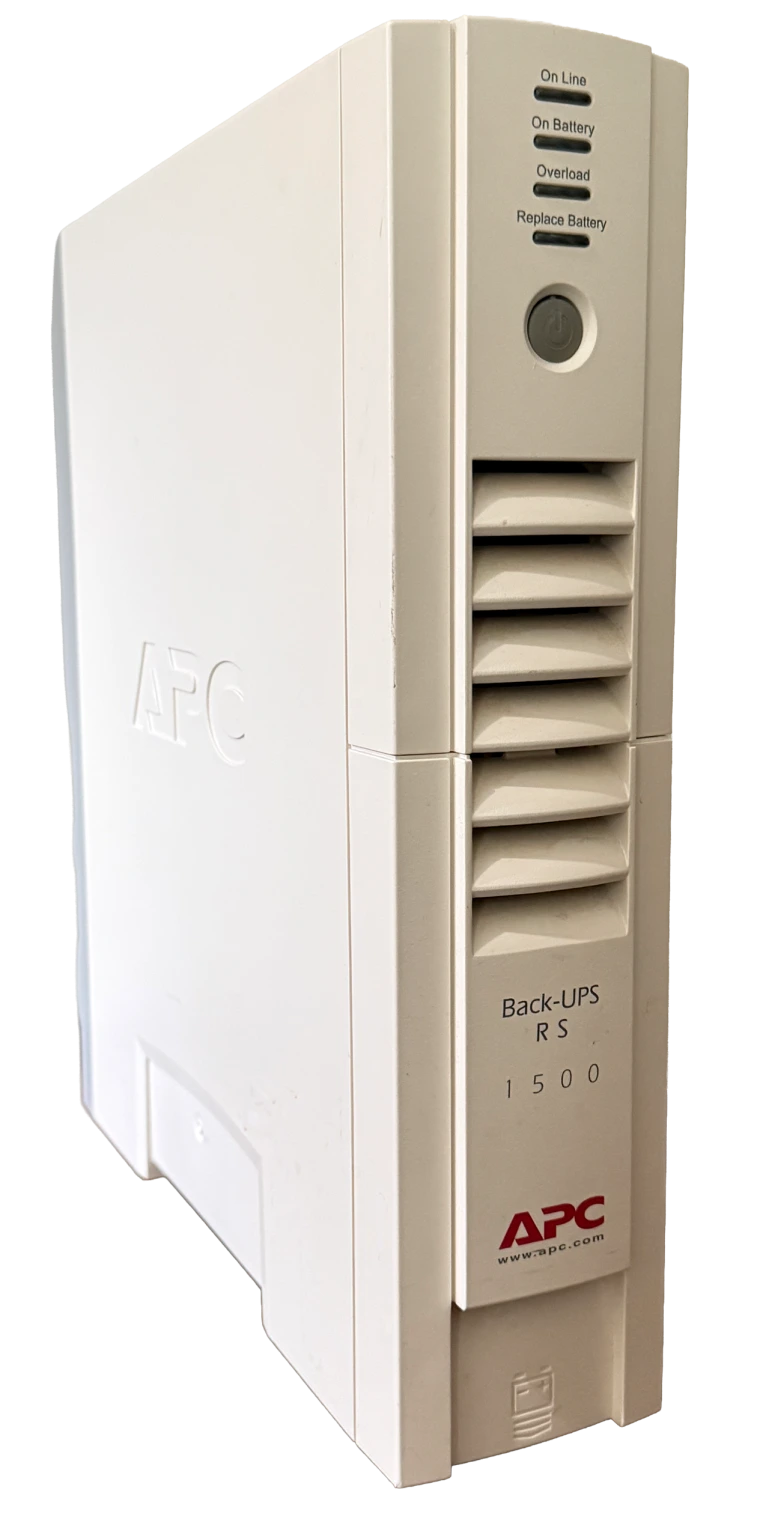
A UPS — short for Uninterruptible Power Supply — is the next step up. At heart it's a surge suppressor with a rechargeable battery built in, and that battery changes everything. A UPS does three jobs:
- It suppresses spikes, just like a surge strip.
- It rides through brownouts. When the power dips low (a "brownout"), the battery feeds in from its reserve to smooth the supply back out, so your computer never feels the sag.
- It takes over instantly in a blackout. If the power fails completely, the battery picks up the load the very same instant — your computer just keeps running. The unit sets off a loud, insistent beeping alarm so you know you're now on battery.
How long it keeps you running depends on the size of the battery, which you'll see rated in volt-amps (VA) — numbers like 500 VA, 1000 VA, or 1500 VA. As with Joules, bigger is better: a higher VA rating means it can power more equipment and keep it running longer, anywhere from about five minutes to much longer. That window is the whole point — it gives you time to save all your work and shut the computer down properly instead of having it drop dead mid-sentence.
The best part: a UPS can shut your computer down for you
Here's a feature people don't realize they have. A good UPS comes with a cable that plugs into a USB port on your computer. The moment the unit switches to battery, your computer gets a signal and starts watching the battery level on the UPS. If the power doesn't come back and the battery runs down to around 5%, the computer performs an automatic, clean shutdown on its own — saving things in order and closing down properly before the battery is empty.
That's the piece that makes a UPS so valuable when you're not sitting there. If the power fails in the middle of the night, or while you've stepped out, you don't have to be at the keyboard to save the day — the UPS and your computer quietly handle the graceful shutdown between them. Plug in that one cable, and your machine is looked after even when you aren't.
Don't forget the surge when the power comes back
Here's something people overlook. When the power goes out and then comes back on, the return is often not gentle — there's frequently a surge riding in with the restored power. That returning jolt can be just as damaging as the original outage. This is exactly why the surge-suppression part of your protection matters as much on the way back as it did on the way out — and another reason a bare power strip leaves you exposed.
Lightning, and a story worth remembering
If you're at your computer during a lightning storm, there's a real chance of an outage. Worse, if lightning strikes a transformer or even a power line, it can send an enormous amount of energy toward your home or business in an instant.
I can speak to this from the moment I'm writing it: as I type this, I'm actually in the middle of a blackout. But I'm still working — my computers are on battery backup, and I happen to be on a MacBook Pro whose own battery lasts close to twenty-four hours, so I don't even have to stop. If you're on a desktop computer, though, that's your cue: save your work and shut down gracefully while the UPS is holding things up.
A true story. I once had a customer whose home was struck by lightning. The energy was so great it literally blew the power plugs out of the wall and across the room. Ask yourself: would your computer survive that if it were plugged straight into the wall? During a serious storm, the safest thing of all is to shut down and unplug.
The trick most people miss: a UPS has two kinds of outlets
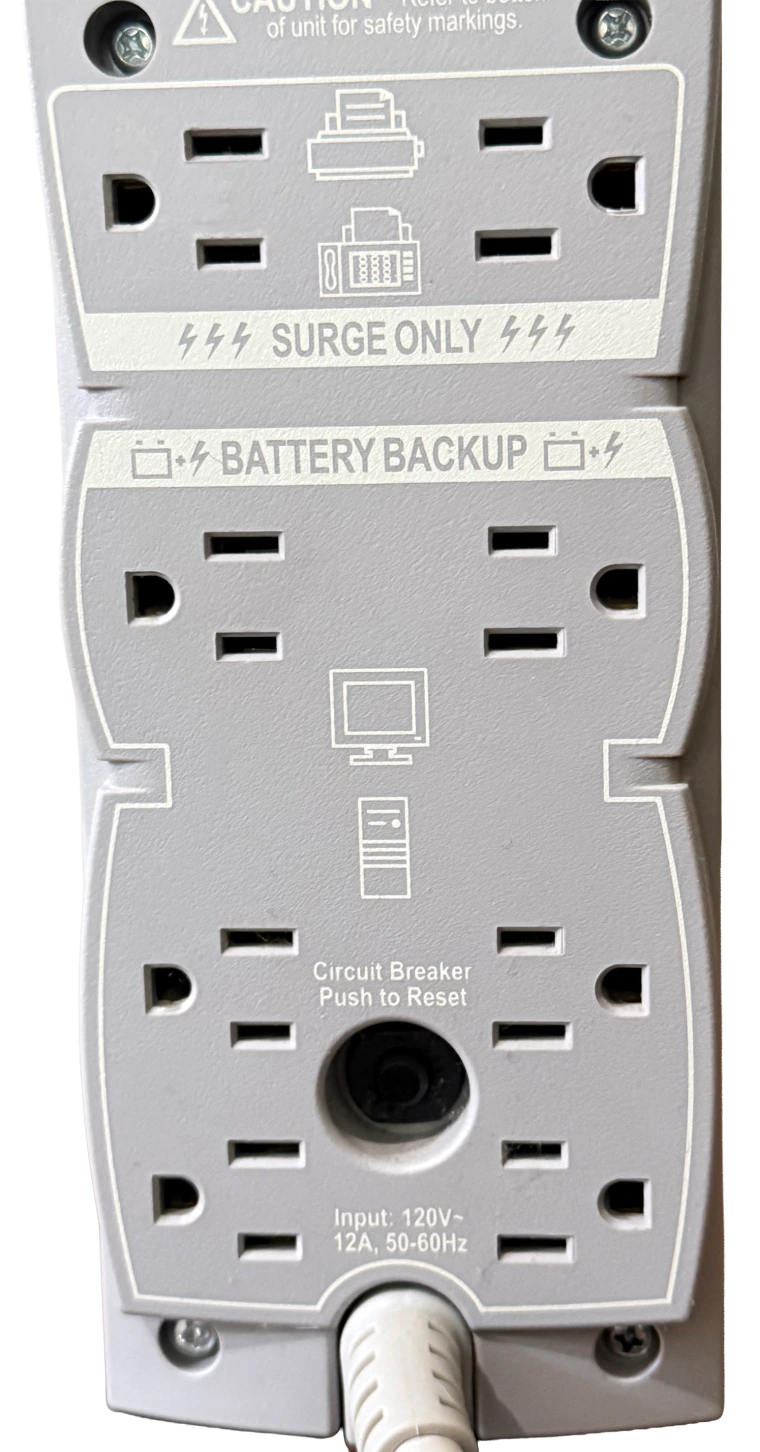
This is the part folks almost always get wrong, so look closely at the back of any UPS before you plug things in. The outlets are split into two groups, and they are not the same:
- Battery backup + surge — these outlets get spike protection and the battery.
- Surge only — these outlets get spike protection but no battery.
The labels are printed right on the unit. Plug your computer and monitor into the battery-backup side — those are the things you need kept alive long enough to save and shut down. Plug your printer into the surge-only side. You don't need the printer running during an outage, and printers can draw a lot of power — leaving one on the battery would drain your runtime fast and cut down the time you have to save your work.
So — leave it on, or shut it off?
Now we can answer the question we started with. If you're going to leave your computer on all the time, you need a UPS. That's the precaution that makes it safe. With a good UPS standing guard — smoothing the dips, swallowing the spikes, and carrying you through outages long enough to shut down cleanly — leaving a computer running around the clock is perfectly fine. That's exactly why mine stay on.
If you don't have that protection, the calculus flips. At the very least put a real, well-rated surge suppressor between your computer and the wall — and when you're done for the night, or whenever a storm is rolling in, save your work and shut down properly rather than leaving an unprotected machine exposed to whatever the power lines throw at it.
The short version: Leaving it on is fine if it's properly protected — and a UPS is what "properly protected" means. No protection? Don't leave it running unattended, and never ride out a storm plugged straight into the wall.
Not sure what you've got — or what to buy?
If you're unsure whether your strip is actually a surge suppressor, what size UPS your setup needs, or how to wire it all up correctly, that's an easy thing for me to sort out with you. Get in touch or call 817-994-7111 and we'll make sure your equipment is protected the way it should be.