This guide walks you through installing JumpDesktop Connect so Dr. Bob can connect to your Mac and fix the problem remotely — no house call needed. It takes about five minutes. If you're setting up on this same Mac, click the Download PDF button above and print it first, so you can follow the steps on paper while you install.
This is for your computer, not your phone. These steps set up Connect on the Mac you want Dr. Bob to help with — not a phone or tablet. If you're reading this on a phone, do the setup on that Mac when you're ready, or just call and we'll do it together.
Before you start
You'll need your Mac, an internet connection, and a few minutes. You'll download a small free app called JumpDesktop Connect and install it. During the install, you'll enter Dr. Bob's access code. This will link you to his account. When you need remote support, you just call and Dr. Bob will send you a request to let him connect. You have to approve his request before he can connect, so you stay in control the whole time and can end the session whenever you like.
Close your browser once the install starts. After you've downloaded the installer and begun the install, close your web browser so it isn't hiding the installer windows — they can open behind it and look like nothing happened.
Install JumpDesktop Connect
Download Connect for Mac
Click the Start remote support button in the sidebar to open the download page. Choose “I want to set up this machine for remote access,” then open the downloaded
.dmgfile.Run the installer
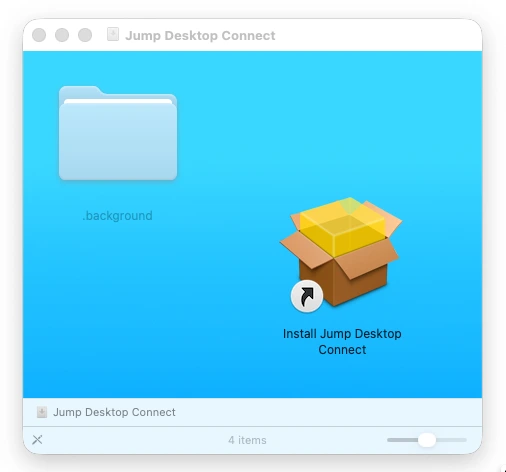
The disk image opens to a window with an Install Jump Desktop Connect icon (shown below). Double-click it and follow the prompts — there's no dragging to do.
Enter Dr. Bob's access code
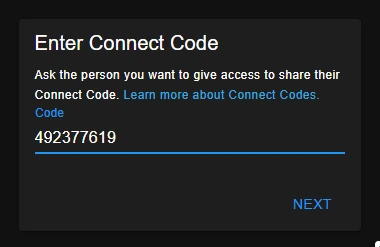
During setup, enter Dr. Bob's access code (492 377 619). This links your Mac to his account — you only do this once.
Allow the macOS permissions
When prompted, grant Screen Recording and Accessibility in System Settings → Privacy & Security so Dr. Bob can see and control the screen.
When you need help
Call Dr. Bob
When something's wrong, just call 817-994-7111. Because your Mac is already linked, there's nothing to set up again.
Approve the connection request
Dr. Bob sends a request to connect; approve it and he can work on your Mac while you watch. He can't connect until you approve.
That's it
You stay in control the whole time and can end the session whenever you like. If anything ever looks off, just call Dr. Bob - 817-994-7111.